
GO Eyewear Try-On is Now Available on WordPress.org
Our virtual try-on is now on the WordPress Plugin Directory. GO Eyewear Try-On brings real-time try-on, 360° view and PD measurement to any WooCommerce store.
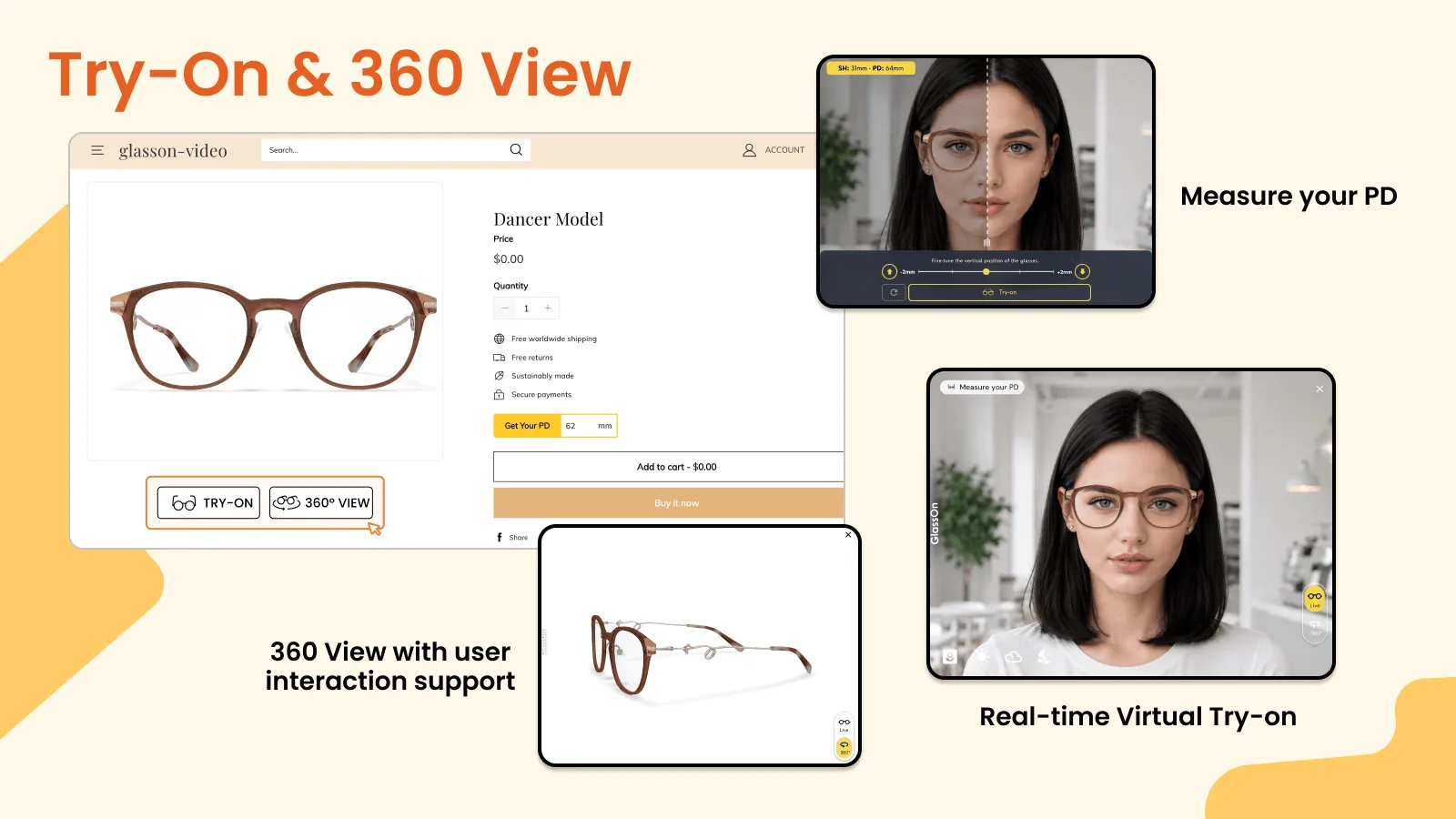
WooCommerce runs a large share of the independent eyewear stores we talk to, and for years the answer to “can I use GlassOn on WordPress?” was a custom integration. Not any more. GO Eyewear Try-On is now published on the WordPress Plugin Directory, so it installs the same way as any other plugin — search, install, activate.
Why it is called GO
GO is short for GlassOn — same service, same team, same dashboard. The WordPress Plugin Directory asked us to publish under a name that does not collide with a registered third-party mark in the eyewear category, so the plugin ships as GO Eyewear Try-On. Our logo has always drawn a G and an O as a pair of spectacles, so it carried over unchanged. If you already have a GlassOn account, it is the account you sign in with.
What your shoppers get
- Real-time try-on. The frame is placed on the shopper's face through their camera, live.
- 360° view. A full rotation of the frame they can drag and spin.
- PD measurement. Pupillary distance measured on camera, which is the number most shoppers cannot find when ordering prescription lenses.
The buttons sit on the product page and, if you want them there, on category and shop pages too. PD stays on the product page only — a measurement flow does not belong in a catalogue grid.
Installing it
Install and activate, then open GO in your WordPress admin menu and click Connect store. That creates your account and links this store to it. Until you click, the plugin makes no request to our service at all — opening the screen sends nothing anywhere.
Requirements are modest: WordPress 6.5 or newer, PHP 7.4 or newer, and WooCommerce.
Getting a frame ready
A 3D model is built from two product photos you upload from the dashboard. This is a human-assisted process, not an instant filter: our team builds and quality-checks each model, which takes hours to days depending on the frame. You can follow the state of every request in the try-on list, and switch try-on on or off per product.
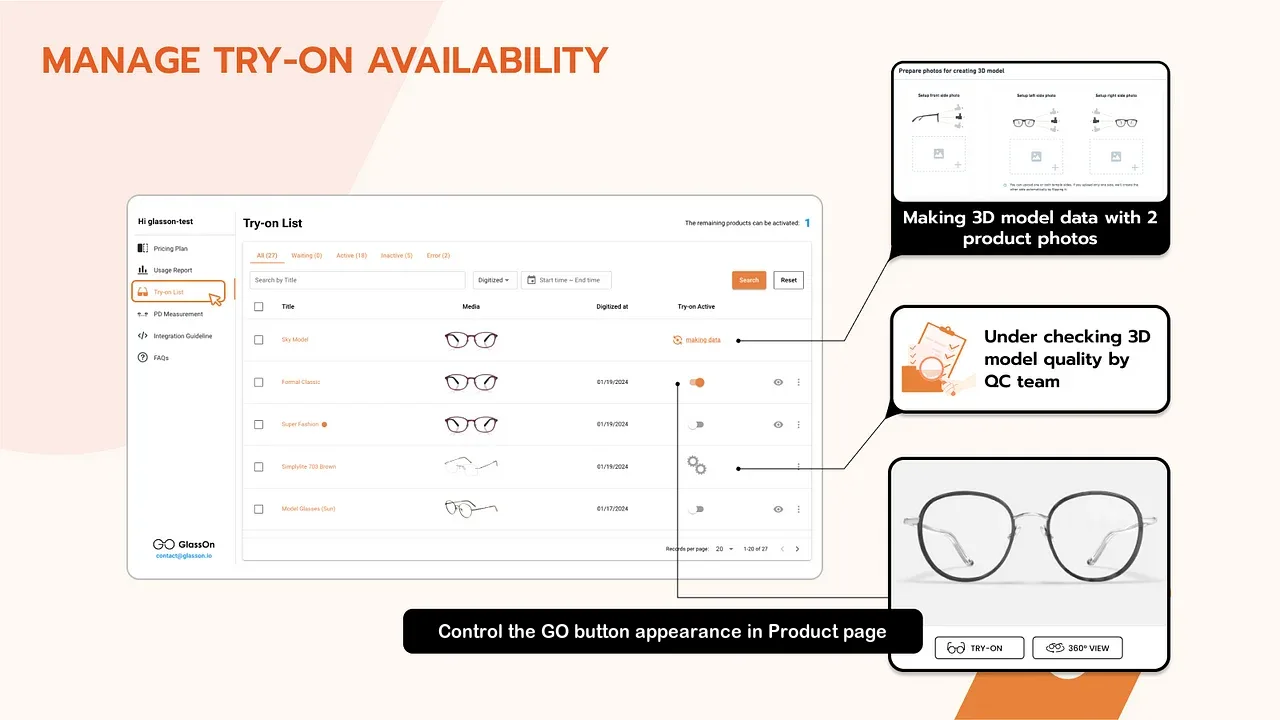
One deliberate behaviour worth knowing: the try-on buttons appear on a frame only once its 3D model has been delivered and try-on is switched on for it. A frame whose model is still being built, or whose photos were rejected, shows no buttons and loads none of the widget code. Nothing half-finished reaches your shoppers.
Where the buttons go
There is no single spot that works across every WooCommerce theme, so placement is a setting rather than a guess. Under GO → GO Buttons you choose which WooCommerce hook the buttons attach to and at what priority, on the product page and in the catalogue separately, plus alignment, colours, labels and full-width.
For block themes and page builders that never fire the classic WooCommerce hooks, the plugin
falls back to placing the buttons with JavaScript. And if you would rather put them exactly where
you want them yourself, use the [go_try_on] shortcode or the
GO Try-On block.
Knowing whether it works
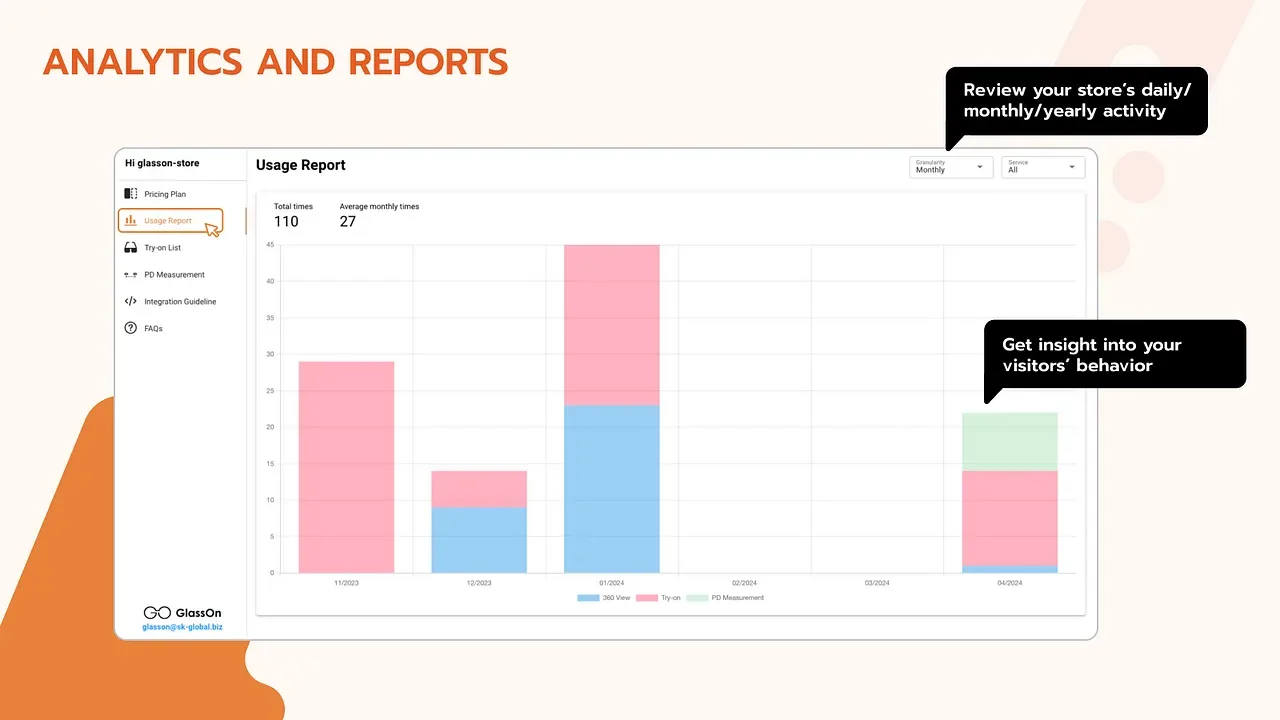
Try-on, 360° view and PD measurement are each counted separately, by day, month or year, so you can see which of the three your shoppers actually reach for before deciding what to expand.
What it costs
The plugin itself is free on WordPress.org. Model building and the try-on service are billed on your GlassOn account, and every plan adds $1 per 3D model adjustment when you ask a human designer to refine a model. Billing happens on the dashboard, not inside WordPress.
Also on Shopify, Shoplazza and PrestaShop
WordPress joins the platforms we already publish on, so a merchant running more than one storefront gets the same try-on from one account. We announced Shopify and Shoplazza and PrestaShop earlier.
Start today
Install GO Eyewear Try-On from the WordPress Plugin Directory, connect your store, and upload photos of your first frame. Tell us which frames you want built first and we will start there.
Virtual Try-on, Real Confidence.
— The GlassOn Team
Published on Sep 3, 2026